🎯
Pick what to block
Choose from a catalog — Instagram Reels, YouTube Shorts, TikTok, X, Reddit and more — or add any custom site. No hosts or regex to fiddle with.
 BrainRotDoctor
Reels, Shorts, the endless feed — they don't want you to leave, and your brain keeps saying "just one more." BrainRotDoctor gives those sites a strict time budget and closes the tab when it's up. The friction your willpower has been missing.
One .exe, ~71 MB · installs per-user · 31 languages
 ▶
♥
∞
↻
▶
♥
∞
↻
You opened it to check one message. Forty minutes later your thumb aches, the feed is still infinite, and you couldn't name a single thing you saw. That's the loop. Browser extensions get switched off in three clicks — so they don't work. This is built to be annoying to bypass on purpose.
You make rules. A rule is simply what to block and when.
Choose from a catalog — Instagram Reels, YouTube Shorts, TikTok, X, Reddit and more — or add any custom site. No hosts or regex to fiddle with.
"Allow 5 minutes per hour, then block." Enough for a peek and a laugh, not enough to disappear for the afternoon. Refills every hour.
Block completely during a window — say 23:00–07:00 on weekdays — so bedtime stays bedtime and mornings start without the feed.
Lock everything for a set time behind a double opt-in. While it's on you can't edit the rules, quit, or even uninstall from Windows the easy way.
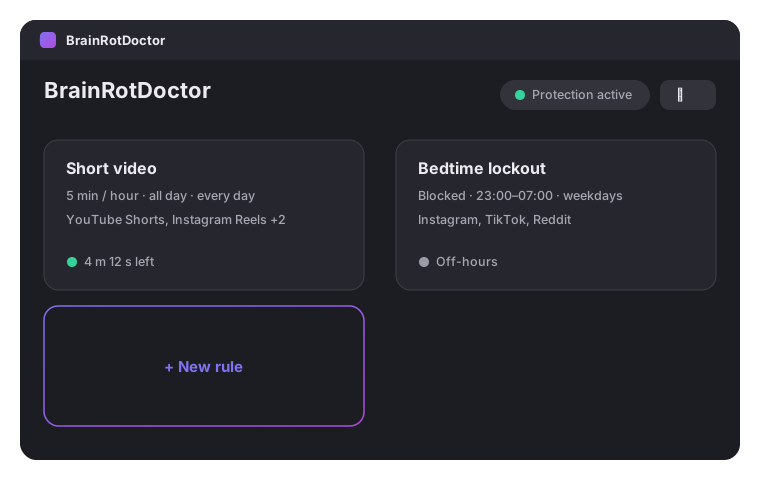
Your rules at a glance — with live status: how much time is left, or what's blocked right now.
Grab the single BrainRotDoctor.exe and double-click it.
Windows will warn about an unknown publisher (it's unsigned, open-source). Click More info → Run anyway.
Click Install in the prompt. It sets itself up for your user, starts with Windows, and begins protecting you.
No administrator rights required — it installs under your own user folder. To remove it later, use Windows "Apps & features" (this won't work while strict mode is active — that's the point).